![Vapaus_Favicon.png]](https://www.vapaus.io/hs-fs/hubfs/Vapaus_Favicon.png?width=50&height=50&name=Vapaus_Favicon.png)
Make sure you're using the right webpage
The User App account log-in page is user.vapaus.io/sign-in
There are different sign-in pages (depending on the customer type):
- User App: user.vapaus.io/sign-in
- Admin portal: admin.vapaus.io/sign-in
- Partner shop portal: shop.vapaus.io/sign-in
You've forgotten your password
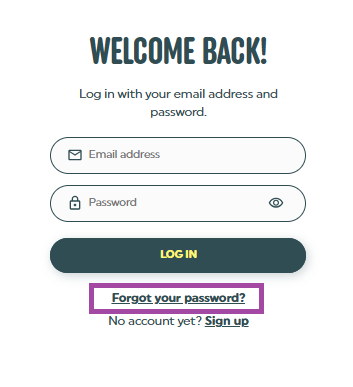
- Go to the employee sign-in page and click “Forgot your password?”.
- Enter your email address.
- Check your inbox for the reset email. If it’s not there, check your spam folder.
- Click the link and create a new password.
- Log in with the new password.
You've forgotten your email
Try the reset steps above with each of these addresses: your personal email, your work email, and any other address you might have used.
If none of them works, contact us with:
- any email address you think you used
- your full name
- when you last tried to log in
We'll help you regain access to your account.
We suggest that you add a personal email address to your account now, so you can still log in if you change jobs.
Need help? Submit a support request.