![Vapaus_Favicon.png]](https://www.vapaus.io/hs-fs/hubfs/Vapaus_Favicon.png?width=50&height=50&name=Vapaus_Favicon.png)
You can access your complete contract details and terms directly in the Vapaus User App. Your contract includes your bike package price, lease duration, monthly taxable value, residual value, and terms and conditions.
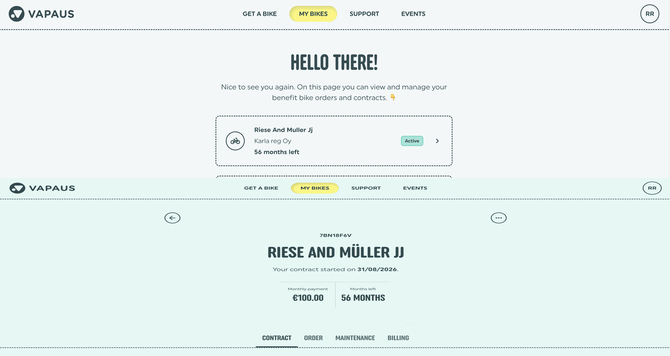
How to view your contract
- Log in to your account at user.vapaus.io
- Click "My bike" in the top navigation bar.
- Select your bike by clicking the grey box containing your bike's name and employer.
- Go to the "Contract" tab in the middle navigation menu.
- Scroll down to view your contract details or click the link to open the accepted terms and conditions.
Need a PDF copy? Use your web browser’s print function (Ctrl+P or Cmd+P) and select "Save as PDF".